
Take Control of Rheumatic Symptoms with Rheumera

Log what you feel in under a minute. Turn patterns into better conversations with your care team.

Educational content only; do not share personal health information on this site.

Getting Set Up with Your Clinic

Connecting to your clinic makes every check-in more useful. Confirm your identity with your date of birth, phone number, and clinic code. Choose Face ID, mobile, or password to sign in, then review our brief consent and privacy note. This link lets your care team view summaries between visits—so they see the full story, not snapshots.

  • • Confirm identity with Date of birth, Phone, and Clinic code.
  • • Create a secure login: Face ID, phone, or password.
  • • Review consent & privacy.

Red-flag: Can't find your clinic or code? Call your practice for help. Don't enter personal health details on this public site.

Clinic confirmation screen requesting date of birth, phone, and clinic code.
Clinic confirmation helps you connect safely.
Rheumera login options including Face ID, mobile number, or password.
Choose Face ID, mobile, or password to sign in.
Home screen showing daily reminder and ‘Record now’ prompt for pain level.
The Daily Reminder highlights exactly what to do today.

Daily Home — A Simple Routine

Your home screen keeps today simple. The Daily Reminder shows one clear task—usually a quick pain check or a question from your provider. Tap Record now and you're done in moments. Add optional steps like connecting activity or logging a flare if something changed. This small routine pays off: your care team sees steady, day-by-day context instead of trying to reconstruct weeks from memory.

  • • Tap Record now for today's question.
  • • Add optional steps (e.g., connect activity).
  • • If a flare starts, use Record flare.

Rate Your Pain in Seconds

Pain changes—capturing it consistently turns feelings into data your provider can act on. Slide from 0-10 to rate today's pain. If anything is different (poor sleep, extra stress, overactivity), add a short note. That tiny bit of context helps explain spikes and keeps your weekly score meaningful. Most days, this takes less than a minute.

  • • Slide to choose today's pain (0-10).
  • • Add a short note if something changed.
  • • Save—done in under a minute.
Pain rating slider from 0 to 10 with an optional notes field.
A clean 0-10 slider with optional notes for context.
Question card asking about joint tenderness or swelling with four response buttons and a notes field.
One-tap options for tenderness and swelling, with room for notes.

Track Tenderness & Swelling

Tenderness and swelling often shift before pain does. Logging them gives an early signal that a flare may be building—or that things are settling down. Choose Tenderness only, Swelling only, Both, or Neither, and add a brief note if helpful. Your weekly score updates automatically so you and your provider can spot patterns sooner.

  • • Pick one: Tenderness, Swelling, Both, or Neither.
  • • Add a short note to capture context.
  • • Submit—your weekly score updates automatically.

Add or Record Additional Symptoms

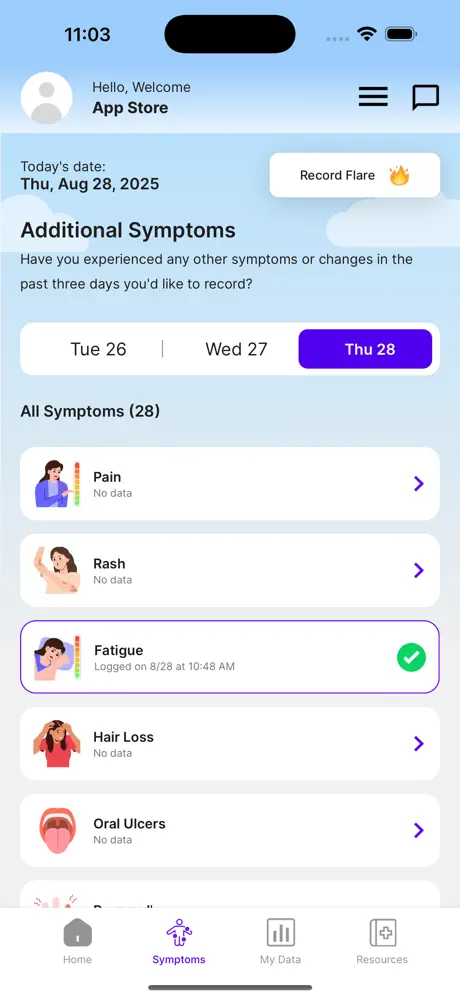
Symptoms beyond pain matter—fatigue, rashes, mouth sores, and more can point to what's changing. Browse the list and tap to log what applies (for example, Fatigue). If symptoms spike suddenly, use Record Flare to capture the moment while you remember details. Keep entries brief; one or two lines are enough to anchor the story you'll share at your visit.

  • • Tap a symptom (e.g., Fatigue) to log it.
  • • Use Record Flare when symptoms spike.
  • • Keep notes short—one or two lines.
Symptoms tab showing a list including Pain, Rash, Fatigue with a “Record Flare” button.
A dated symptoms list with a clear “Record Flare” button.

Medications & Gentle Reminders

Staying consistent reduces flares and avoids gaps. Add each medication once, set morning, afternoon, and evening times, and let reminders do the work. Use the notes area to record dose changes or side-effects so your provider sees what changed and when. Plan refills 5-7 days before you're out to keep therapy steady.

  • • Add each medication and set reminder times.
  • • Note dose changes or side-effects for context.
  • • Request refills 5-7 days before you're out.
Medication screen showing a listed drug with three daily reminder times and edit/delete controls.
Your meds in one place with flexible daily reminders.
Resources screen with tiles for Living Well, Diseases & Conditions, Your Treatments, and more.
Topic tiles make it easy to find trusted guidance.

Learn What Helps (Education Library)

Reliable, reviewed information is a tap away. Start with Living well, browse Diseases & Conditions, or learn more about Your Treatments. Save one or two articles to revisit later, and bring questions to your next appointment. Small skills—sleep routines, gentle movement, stress strategies—often make big differences over time.

  • • Open Living well, Diseases & Conditions, or Your Treatments.
  • • Save 1-2 articles to revisit later.
  • • Bring questions from what you read to your next visit.

Connect with Your Care Team

Between visits, small changes can matter. With Rheumera’s Remote Therapeutic Monitoring (RTM), you can check in, share how you’re doing, and get guidancefrom your clinic—without waiting for your next appointment.

  • Message your care team when you have questions about symptoms or side-effects.
  • Weekly nudges help you log pain, fatigue, stiffness, activity, and meds in minutes.
  • Smart alerts flag concerning trends so your clinic can follow up.
  • Visit-ready notes keep decisions focused and reduce “recall” stress.

For urgent issues, call your clinic or emergency services. Messages are handled during clinic hours. This demo site doesn’t collect personal health information.

How RTM WorksTime: ~2–3 min • Educational only
Patient speaking by phone with a clinic nurse in a calm, private setting.
Staying connected between visits helps catch changes early.

Pull It Together for Visits

Arrive prepared with a one-page view of the last week. Export a 7-day summary(demo on this site—no PHI), list your current meds and any side-effects, and write your top three questions. This keeps the visit focused on decisions instead of recall, and helps your provider understand what changed between appointments.

  • • Export a 7-day summary to frame the conversation.
  • • Bring your med list and note any side-effects.
  • • Write your top 3 questions to cover what matters most.

Demo preview

Visit Prep — Last 7 Days

My Week at a Glance

Avg Pain
4.6
Avg Fatigue
5.2
Flares
Yes (1)

Medications

  • Methotrexate
    15 mg weekly • Nausea day after
    Current
  • Folic Acid
    1 mg daily • No issues
    Current

Top 3 Questions

  1. Is my current dose appropriate given last week's flare?
  2. Could morning stiffness relate to sleep or activity?
  3. When should I schedule labs before next visit?

This sheet is for discussion. Not medical advice.

A compact snapshot you can print or bring on your phone.

Demo preview

My Flare Plan

What I'm feeling

  • Pain ↑
  • Swelling
  • Stiffness
  • Fatigue

What I'll do

  1. Rest and pace my activity.
  2. Gentle movement or stretching as tolerated.
  3. Heat/cold on sore joints (as directed).
  4. Hydration and regular meals.
  5. Log the flare and suspected triggers.

When I'll call my clinic

  • Sudden severe swelling or new joint involvement
  • Fever or feeling unwell
  • Pain not improving or I'm unsure what to do

Notes

What helped, possible triggers, questions for my provider…

This plan is educational. If you're unsure, call your clinic.

A fridge-friendly plan for the moments that matter.

Your Flare Plan

Flares happen. A written plan reduces stress and speeds next steps. Follow simple self-care (rest, gentle movement, heat/cold, hydration), log the flare and any suspected triggers, and watch for red flags like sudden severe swelling or fever. If you're unsure, call your clinic. Having this plan ready means you spend less time reacting and more time recovering.

  • • Follow simple self-care steps.
  • • Log the flare and suspected triggers.
  • • Call your clinic for red-flag changes or any uncertainty.

For Caregivers

How to help today

Keep routines simple—reminders, water, light stretching, short walks if comfortable.

At appointments

Start with the top three questions; show the 7-day snapshot for context.

During flares

Offer practical help first and listen. Avoid minimizing—small tasks are big wins on tough days.

Educational content only; do not share personal health information on this site.

FAQs

Who pays for Rheumera?
Rheumera, is a covered benefit from most health insurance plans, including Medicare. Your provider may bill your insurance for usage of the program. For billing questions contact your provider.
Who sees my entries?
Your clinic can view them if you connect your account.
What if I miss days?
Resume anytime—trends still help even with gaps.
How are weekly scores calculated?
A blend of your daily ratings and check-ins.
When should I call my clinic?
Rapidly worsening symptoms, new severe swelling, fever, or any doubt.
Can I export my data?
Yes—bring the 7-day summary to your visit.

Educational content only; do not share personal health information on this site.

What you can do with Rheumera

Small, consistent actions turn into clear trends you can share with your care team—so every visit starts with context, not guesswork.

Quick check-ins

Rate pain in seconds and add a short note. Tiny daily steps create useful patterns.

Learn moreTime: ~1 min
Educational only; do not share personal health information.

Log a flare

Capture spikes while you remember what changed. Use your plan to reduce stress.

Learn moreTime: ~1–2 min
Educational only; do not share personal health information.

See 7–30 day trends

Compare pain, fatigue, and wellness. Spot patterns tied to sleep, stress, or activity.

Learn moreView: 7 or 30 days
Educational only; do not share personal health information.

Medication reminders

Set morning, afternoon, and evening times. Note dose changes or side-effects.

Learn moreRefills: plan 5–7 days ahead
Educational only; do not share personal health information.

Visit prep, simplified

Export a 7-day summary and list top questions. Keep the visit focused.

Learn more1 page snapshot
Educational only; do not share personal health information.

Education you can trust

Read Living well, Diseases & Conditions, and Your Treatments—reviewed and reliable.

Learn moreRead: 5–8 min
Educational only; do not share personal health information.

Imagine a world where you are the copilot to your care plan...

Start charting your own course of care, reach out to learn more about how you and your provider can get started using Rheumera.

Download on the App StoreGet it on Google Play

If you are experiencing a medical emergency and need help please call 911 or go to the nearest emergency room.